Government work rarely happens in one place. Even routine processes often span multiple systems, documents, and teams before they are complete.
Financial data must be reconciled across platforms. Procurement decisions depend on information pulled from multiple sources. Reports require inputs gathered, validated, and formatted across systems that were never designed to work together. Over time, this coordination creates operational drag that limits how efficiently teams can move and how much time they can spend on higher-value work.
This is where automation becomes worth a closer look.
For agencies working to improve performance without disrupting existing systems, UiPath offers a practical way to streamline repetitive, rules-based work across platforms, documents, and data sources. More importantly, it provides a clearer understanding of where automation is already delivering measurable results and how it can be applied responsibly within government environments.
What UiPath Actually Does
At its core, UiPath is built on Robotic Process Automation (RPA), which refers to software that mimics how a person interacts with applications. It can log in, navigate systems, extract information, move data, and complete structured tasks across multiple platforms.

These automations are designed as workflows, which define how a process runs step by step. Once built, those workflows are executed by software “robots.”
There are two primary types:
- Attended robots, which assist users in real time on their desktops
- Unattended robots, which run independently in the background to handle high-volume, back-office work
What makes UiPath particularly relevant in government environments is its ability to operate across systems that were never designed to work together. It can interact with applications through user interfaces, connect through application programming interfaces (APIs), process structured data such as spreadsheets and databases, and extract information from documents using optical character recognition (OCR).
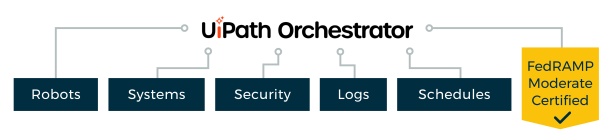
All of this is coordinated through UiPath Orchestrator, a centralized control layer that manages scheduling, security, access, and audit logs. UiPath’s Automation Cloud Public Sector is also authorized under the Federal Risk and Authorization Management Program (FedRAMP) at the Moderate level, allowing agencies to adopt automation within a compliant cloud environment.
In practical terms, UiPath does not require agencies to wait for perfect systems. It works across the systems they already have.
Why This Matters in Government Operations
Government environments are inherently complex. Systems evolve over time, missions expand, and new requirements are layered onto existing infrastructure. As a result, many critical processes span multiple platforms rather than existing within a single, streamlined system.
The most time-intensive work often happens in the transitions, when teams gather data, validate records, process forms, assemble audit support, and move information between applications that do not communicate seamlessly.
This is where automation becomes practical, not theoretical.

Rather than replacing existing systems, UiPath acts as a non-invasive integration layer, allowing agencies to improve workflows within current environments while longer-term modernization efforts continue.
As a result, organizations can reduce operational friction now instead of waiting for a complete system overhaul.
Where Automation Is Delivering Measurable Impact
The value of automation becomes clearest when looking at how agencies are already applying it in high-effort workflows. Across public sector use cases, a consistent pattern emerges: automation is most effective where work is essential, repeatable, and slowed down by the number of systems, documents, and handoffs involved. Let’s dive in to some key case studies where UiPath has made a lasting impact.
UiPath’s Impact Across Sectors

Streamlining procurement and vendor validation
At the Internal Revenue Service (IRS), procurement teams were required to collect and validate data from more than 20 sources to complete contractor responsibility determinations. UiPath reduced that process by approximately 90 percent, saving an estimated 15,000 hours annually.
At the General Services Administration (GSA), contracting tasks that previously took 15 to 20 minutes were reduced to seconds. Within four months, the automation processed 25,000 orders and handled 90 percent of transactions.
These improvements go beyond efficiency. They create more consistent workflows, reduce manual error, and strengthen audit readiness in acquisition processes.
Accelerating financial data gathering and audit support
At the Defense Information Systems Agency (DISA), teams needed to gather financial data to support reporting and compliance auditing. In the well-known “Race the Bot” comparison, a person retrieved two records in 15 minutes while the automated process retrieved 150 in the same timeframe. The broader implementation automated 95 percent of transactions and significantly expanded data retrieval capacity.
This shift allows financial teams to spend less time collecting information and more time analyzing results, reconciling discrepancies, and supporting decision-making.
Improving document-driven operations
At the Department of Veterans Affairs (VA), patient record workflows relied heavily on manual document handling. UiPath helped automate 95 percent of those transactions, increasing processing capacity and reducing downstream disruptions such as canceled appointments.
By combining optical character recognition (OCR) with machine learning, UiPath can extract structured data from unstructured documents and move it into workflows that previously required significant manual effort.
Where Automation Requires Discipline
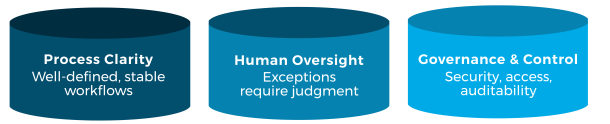
Automation is most effective when implemented with structure and intent. Three factors consistently shape successful outcomes:
- Process clarity
Workflows should be well-defined and stable. Automation amplifies consistency, which means unclear processes must be refined before they scale.
- Human oversight
Structured tasks can be automated, but exceptions often require judgment. A balanced approach ensures accuracy while maintaining efficiency.
- Governance and control
Visibility, access management, and auditability are essential. Platforms like UiPath provide these capabilities, but they must be actively managed to support compliance and trust.
These elements are not obstacles. They are what make automation sustainable in government environments.
Where Technology Meets Operational Expertise
Automation delivers the most value when it is applied with a clear understanding of how work actually gets done. CSCI brings that perspective.
With experience across financial management, audit readiness, enterprise systems, and data transformation, CSCI works alongside agencies to identify where automation can reduce friction, improve consistency, and support mission outcomes. This includes aligning automation efforts with compliance requirements, integrating solutions into existing environments, and ensuring transparency throughout implementation.

UiPath is a powerful platform, but its impact depends on how it is applied. Agencies need more than tools. They need partners who understand their processes, constraints, and priorities.
When automation is implemented with that level of insight, the results are measurable. Work moves more efficiently. Data becomes more reliable. Teams gain the capacity to focus on analysis, decision-making, and mission delivery.
For agencies evaluating where to begin, the most effective starting point is not the technology itself, but the workflows that define daily operations.